The First Offline AI Built Strictly for the Court Record.
Turn transcripts around twice as fast. Generate transcript drafts on your PC or Mac without your files ever leaving your device. 100% Private.
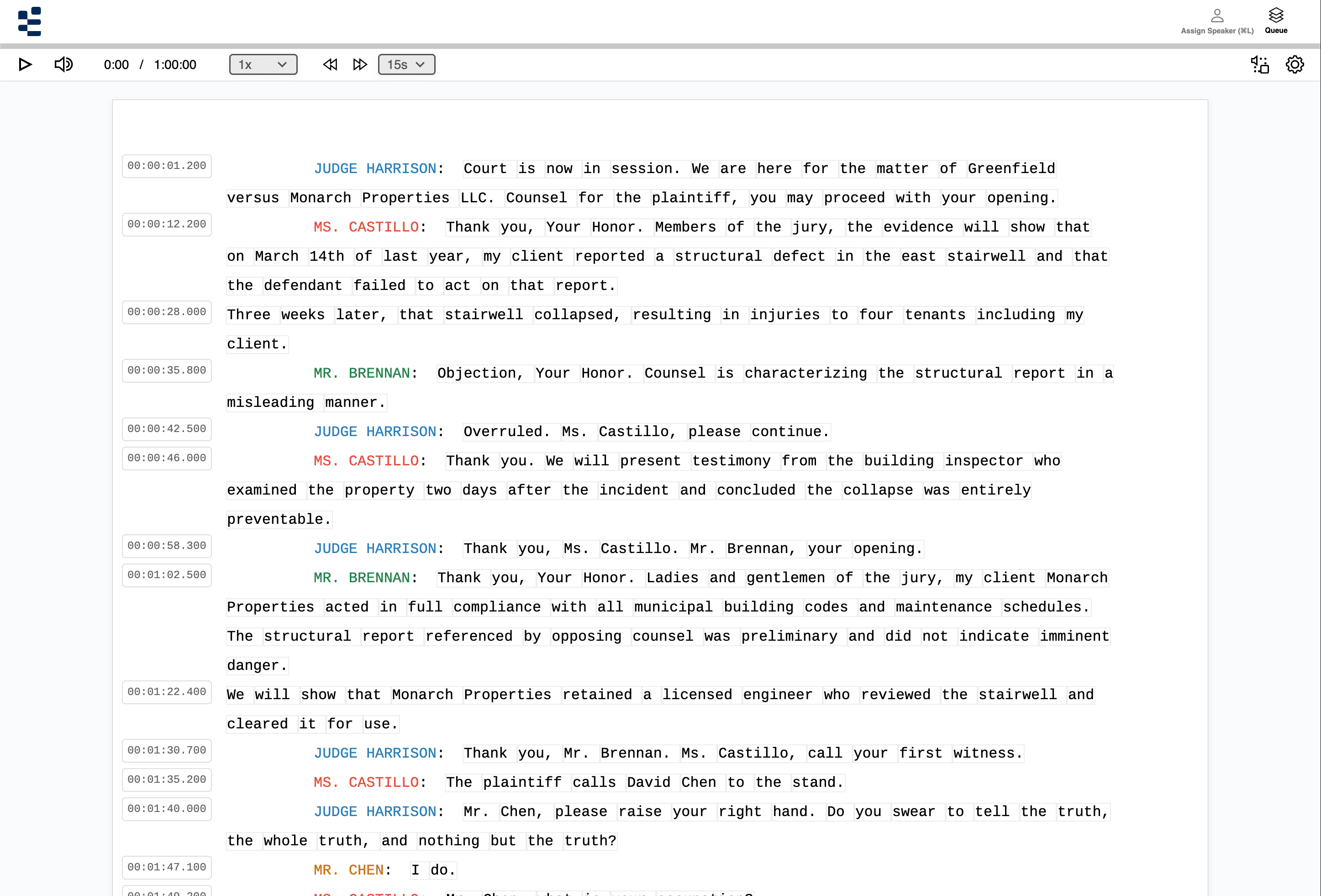
Turn transcripts around twice as fast. Generate transcript drafts on your PC or Mac without your files ever leaving your device. 100% Private.
The legal transcription industry is at a breaking point. The demand for expedited transcripts is growing, but the tools haven't changed in twenty years. You know AI could double your output, but the risks are too high.
Cloud-based tools like Otter or Rev require you to upload sensitive audio to third-party servers—a direct violation of your undertaking. A single data breach could end your career.
So you stick to the manual grind: 4 to 6 hours of typing for every 1 hour of audio. The backlog grows. The deadlines tighten. The physical toll mounts.
The Solution: ArcaScribe handles the first draft so you can focus on proofing, formatting and certifying.
I usually figure at least four hours for every hour of recording, including proofreading. With ArcaScribe, I worked through about 700 pages in the time it would have taken me to type 400. It’s easier on my arms, too. After two straight days of typing from scratch, they’d be burning. I still proofread every page against the recording, but it’s a whole lot better than starting from a blank page.
I like that if I add multiple files from certain folders on my PC, the export goes right back to that folder and is waiting for me. So neat.
“Privacy focused” is a marketing buzzword. “Offline Architecture” is a technical guarantee. When you drag an audio file into ArcaScribe, the transcription process is performed entirely by your own computer. For you, privacy isn't a preference; it's a condition of your license. ArcaScribe guarantees 100% data sovereignty.
Your audio is never uploaded to OpenAI, Google, or our servers.
Aside from a monthly license verification, no telemetry, no analytics, no usage data leaves your machine. Your workflow stays completely private.
Your data is never used to train future AI models.
You can unplug your ethernet cable, turn off Wi-Fi, and ArcaScribe will continue transcribing. Perfect for In Camera proceedings, Child Protection matters, Grand Jury testimony, and Attorney-Client privileged dictations.
Generic AI tools give you a wall of text. ArcaScribe gives you a workspace designed for the courtroom.
Think of ArcaScribe as your tireless junior partner. It creates a robust first draft, anchored to the audio, so you can focus on the high-value work: proofing, formatting, and certifying.
Every sentence is anchored to the audio timecode. Click anywhere in the transcript and press Command P to jump straight to that point in the audio. Perfect for spot-checking “indiscernibles” and verifying phonetics.
Skip the tedious process of manually tagging every speaker change. ArcaScribe’s on-device AI automatically detects different voices in the transcript before you touch a key. Apply your custom speaker list, review and edit the suggestions, and confirm the record.
Most local AI tools are Mac-only. We know the legal world runs on Windows. ArcaScribe is optimized for NVIDIA GPUs and Intel Core processors on Windows, as well as Apple Silicon. One license covers you on both.
ArcaScribe converts them on the spot.
Our Windows guide walks you through a quick export.
Standard audio and video files work too.
From 8-hour trial days to 5-minute arraignments, ArcaScribe handles whatever files you receive.